

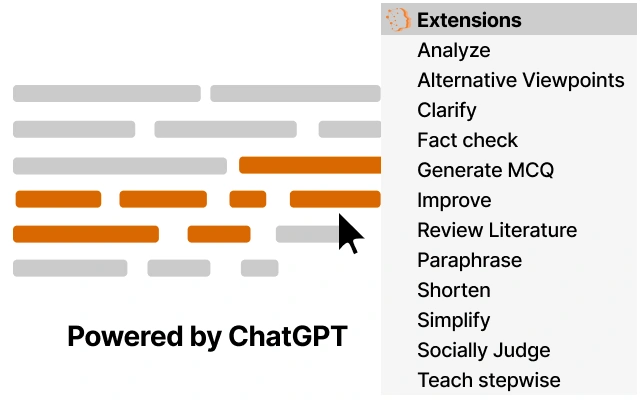
Description
AI-Powered Writing Assistant for Research & Education
Is the 1Cademy extension safe to use?
The 1Cademy extension is developed by a research group at the University of Michigan School of Information and Honor Education. Data collected is solely for scientific research and is never shared with third parties. All published results are based on anonymized data, ensuring user privacy.
Can I use the extension offline?
The extension requires an active internet connection to access OpenAI’s ChatGPT model. Offline functionality is not supported as the core AI processing occurs on remote servers.
What operating systems does it support?
The extension is compatible with Windows, Mac, and Linux systems. It integrates with major web browsers used in academic and research environments.
How often are updates released?
Updates are released periodically to improve functionality, fix bugs, and enhance compatibility with evolving browser and AI platform standards. The latest version is 1.0.0, released on April 15, 2024.
What type of license does it use?
The 1Cademy extension is free to use and distributed under a research-based license. It is not commercial software, and no fees are charged for access or usage.
Overview
The 1Cademy extension is designed to streamline the integration of OpenAI’s ChatGPT into academic and research workflows. By enabling users to access AI-powered assistance through simple text selection and right-click actions, it reduces friction in writing, analysis, and learning tasks. The tool is particularly useful for researchers, instructors, and students who frequently engage in academic writing, literature review, and content refinement. It addresses common challenges such as improving writing clarity, ensuring grammatical accuracy, and enhancing the logical flow of complex texts. The extension also supports fact-checking and the exploration of alternative viewpoints, promoting critical thinking and research integrity. Developed by a research group at the University of Michigan School of Information and Honor Education, the tool reflects a commitment to ethical AI use and academic transparency. Real-world usage scenarios include drafting research papers, preparing teaching materials, summarizing scholarly articles, and generating practice questions for students. The developer did not provide additional system requirements.
Key Features & Capabilities
- One-Click AI Assistance: Activate advanced AI features by selecting text and using a right-click or keyboard shortcut, minimizing workflow interruptions.
- Writing Enhancement: Improve grammar, style, coherence, and overall flow of written content with real-time suggestions and explanations.
- Text Summarization: Condense lengthy academic texts into concise, accurate summaries while preserving key points.
- Paraphrasing & Clarification: Rewrite content in different phrasing to avoid repetition and enhance readability, with clear explanations of changes made.
- Literature Review Support: Extract and organize key insights from multiple sources to aid in synthesizing existing research.
- Question Generation: Automatically create multiple-choice questions from selected text to support learning and assessment.
- Stepwise Teaching Mode: Break down complex topics into digestible learning steps, ideal for educators and self-learners.
- Fact-Checking & Viewpoint Analysis: Verify claims and explore alternative perspectives on topics discussed online.
These capabilities are especially valuable in academic environments where precision, clarity, and depth of understanding are essential. For example, a student writing a thesis can use the extension to refine their arguments, while an instructor can generate quiz questions from lecture notes. The tool’s ability to explain the reasoning behind edits promotes learning and transparency in AI-assisted writing.
User Interface, Workflow & Performance
The 1Cademy extension integrates seamlessly into the browser environment, maintaining a minimalistic interface that avoids clutter. Users interact with the tool through a context menu accessible via right-click or keyboard shortcut, ensuring quick access without disrupting the primary workflow. Navigation is intuitive, with clearly labeled options for each AI function. The extension operates efficiently within the browser, and the developer did not specify resource usage details. Performance observations are based on general software behavior patterns. Stability appears consistent, as the tool relies on remote AI processing rather than local computation. The extension does not appear to significantly impact browser responsiveness or memory usage under normal conditions. However, exact performance metrics were not provided.
Compatibility & System Requirements
The 1Cademy extension is compatible with Windows, Mac, and Linux operating systems. It supports major web browsers commonly used in academic settings. The installation size is 1.5 MB, indicating a lightweight footprint. The software version is 1.0.0, released on April 15, 2024. Exact system requirements were not listed. Platform compatibility information is limited to the supported operating systems and browser integration. The developer did not specify hardware requirements or minimum CPU/RAM thresholds.
Pros and Cons
Pros
- Free to use with no licensing fees
- Seamless integration with web browsers
- Designed specifically for academic and research use
- Supports a wide range of writing and analysis tasks
- Emphasizes user privacy and data confidentiality
- Provides clear explanations for AI-generated changes
Cons
- Requires an internet connection to function
- Does not support offline usage
- Limited system requirement details
- Dependent on third-party AI model availability
- May not be suitable for users without consistent internet access
Final Thoughts + CTA
The 1Cademy extension stands out as a focused, privacy-conscious tool tailored to the needs of researchers, educators, and students. Its ability to deliver advanced AI assistance through simple interactions makes it a valuable asset in academic workflows. With a strong emphasis on ethical data handling and educational transparency, it aligns well with academic values. While it requires an active internet connection and lacks detailed system specifications, its lightweight design and free access make it accessible to a broad audience. For those engaged in writing, research, or teaching, the extension offers a powerful, intuitive way to enhance productivity and learning. Download 1Cademy now to experience AI-powered academic support.
Guides & Tutorials for 1Cademy Assistant Extension for Chrome
How to install 1Cademy Assistant Extension for Chrome
- Click the Preview / Download button above.
- Once redirected, accept the terms and click Install.
- Wait for the 1Cademy Assistant Extension for Chrome download to finish on your device.
How to use 1Cademy Assistant Extension for Chrome
This software is primarily used for its core features described above. Open the app after installation to explore its capabilities.
User Reviews for 1Cademy Assistant Extension for Chrome 0
No reviews found





